










 About us
 Magazine
 Contact







Quick Overview
An ergonomic workspace in a motorhome is achieved through a suitable seating position, a tabletop at elbow height, and a screen at eye level. A seat cushion and a footrest help if the built-in bench seat is too low. In addition, you should incorporate targeted posture changes and good lighting.
- The tabletop should be at approximately elbow height, around 68 to 74 cm above the floor.
- The thighs should be horizontal and the feet should rest flat on the floor.
- The screen should be one arm's length away, about 50 to 70 cm.
- Stand up briefly or change position every 30 to 45 minutes.
- A seat cushion raises your seating position, while a footrest prevents dangling feet.
Table of Contents
- Setting up a workspace in a motorhome: What to clarify beforehand
- Step 1: Determining the right seating position and posture
- Step 2: Choosing and adjusting an ergonomic office chair for your motorhome
- Step 3: Building your own motorhome desk or choosing a suitable table
- Step 4: Setting up your screen, laptop stand, and viewing angle
- Step 5: Planning lighting for your workspace in the camper
- Preventing back pain while working in a motorhome
- Implementing your motorhome workspace now
- Frequently Asked Questions
Setting up a workspace in a motorhome: What to clarify beforehand
Those working in a motorhome often sit on a chair intended for the dining table. The result is tension in the neck and back after just a few days. However, an ergonomic workspace in a motorhome can be well implemented with little space and clear planning.
Before you buy or build anything, clarify three things. How many hours a day do you work in the vehicle? How much free space can you actually use? And what equipment do you need: just a laptop or an additional screen?
- Working hours: One to two hours can be endured on a folding table. Full workdays require more comfort.
- Space: Measure width, depth, and height up to the sloping roof.
- Tech: Laptop, mouse, charger, and potentially a monitor need their own storage areas.
These details will dictate everything else. They determine table size, chair type, and lighting position.
Step 1: Determining the right seating position and posture
The right seating position is the foundation of any ergonomic workspace—in a motorhome, it is even more critical than the equipment, because the built-in bench seats are rarely designed for eight hours of desk work. By following these measurements and adjustment steps, you can prevent most discomfort before it arises.
Ergonomic benchmarks for seated work
Use these guidelines, which stem from office ergonomics and can be applied to motorhomes, as a reference:
- Seat height: Thighs should be horizontal, feet flat on the floor.
- Knee angle: About 90 to 100 degrees, no tighter.
- Elbow angle: About 90 to 110 degrees, with forearms resting loosely on the tabletop.
- Table height: The tabletop should be at elbow height when shoulders are relaxed. Depending on height, this is about 68 to 74 cm above the floor.
- Screen distance: One arm's length, i.e., about 50 to 70 cm between eyes and screen.
- Viewing angle: The top edge of the screen should be at eye level or slightly below; gaze should tilt downwards by 10 to 20 degrees.
- Backrest: The backrest supports the pelvis and lower back; the incline should be about 100 to 110 degrees.
Why the bench seat in a motorhome often doesn't fit
The dinette bench seat is intended for quick meals, not hours of work. Typical problems: The seat surface is too low or too deep, the backrest is too steep, and the table is too high, causing shoulders to hunch. If you work on the bench, you should first check the seat height, not the table height.
A seat cushion raises your position and can bring your thighs to a horizontal level. A footrest under the table prevents your feet from dangling. Both together cost little and can be stowed away in the evening.
Note: A seat cushion that is too thick can reduce the knee angle and restrict blood circulation in the legs—test the height during a workday, not just for five minutes.
Adjusting your seating position step-by-step
- Check seat height: Sit on the bench. If your feet dangle, place a cushion or footrest underneath. If your knees are higher than your hips, the seat surface is too low.
- Support your back: Place a lumbar pillow in the natural curve of your lower back. The backrest should support the pelvis, not just the shoulder blades.
- Check table height: Place your forearms on the tabletop. If your shoulders are hiked up, the table is too high—a lower folding table or seat riser can help here. If your elbows are below the surface, the table is too low.
- Align screen: Place the laptop on a stand until the top edge is at eye level. The same applies to an external monitor.
- Check posture: Sit upright without arching your lower back. Keep shoulders relaxed and your neck straight.
Changing posture throughout the workday
Even the best seating position becomes a strain after 30 to 45 minutes because the intervertebral discs and back muscles react to constant load. Consciously alternate between three positions: sitting upright, sitting reclined, and working standing up—a standing desk substitute can be improvised with a raised folding table or a shelf on the dinette. Getting up briefly every 30 to 45 minutes noticeably relieves the spine.
Note: Those who only plan to change posture but don't follow through usually stay in their habitual position. Set a timer or tie the change to a recurring task like checking the time or refilling your glass of water.
Step 2: Choosing and adjusting an ergonomic office chair for your motorhome
A classic office chair rarely fits in a motorhome. It is bulky and difficult to stow. Many campers therefore rely on compact alternatives with good back support and a stable base.
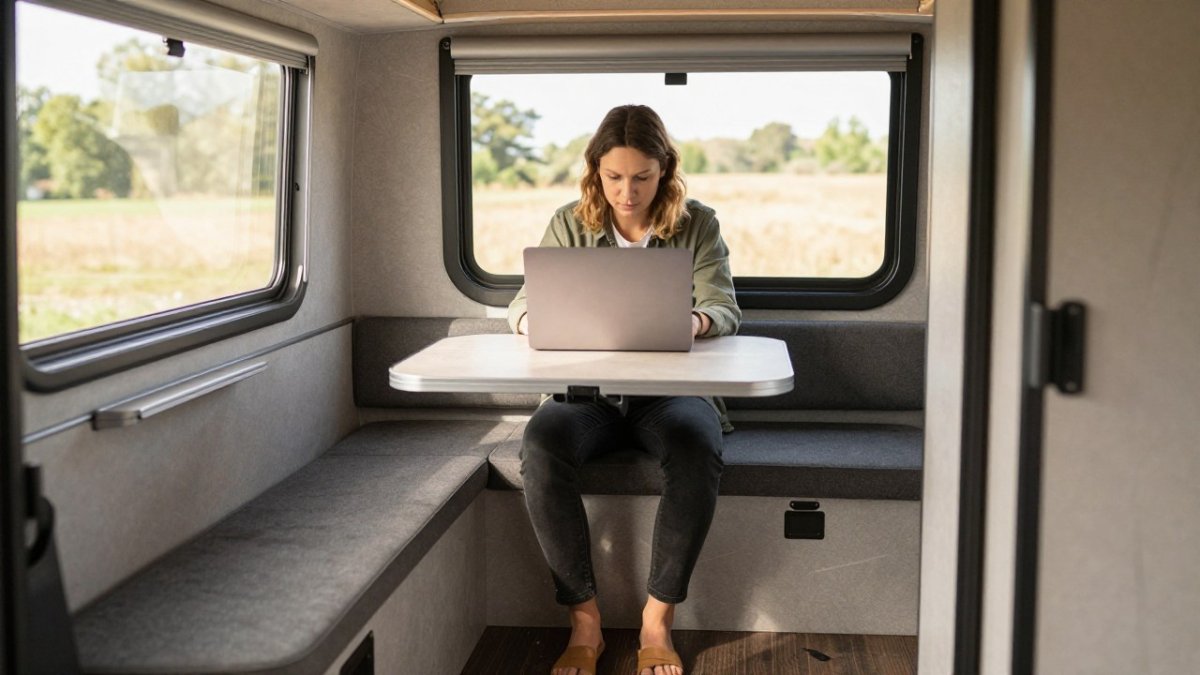
Height adjustment is important. The seat should be adjusted so that your feet are flat and your thighs are not pressed. A chair that is too low puts strain on the hips and back.
- Lumbar support: A pillow behind the lower back supports its natural curve.
- Stable feet: A chair with wheels can easily slide away on carpet. It is better to choose fixed feet.
- Space requirements: Check whether the chair can still move between the table and cabinet.
Test the chair in the vehicle before purchasing, if possible. What feels comfortable in the store may feel different in a cramped motorhome.
Step 3: Building your own motorhome desk or choosing a suitable table
The table determines whether you can maintain the ergonomic seating position from Step 1 at all. In a motorhome, table height is often a compromise because the bench seat and table are fixed—improving this offers the best ergonomic gain per euro.
Determining the correct table height
The tabletop should be at elbow height when shoulders are relaxed. For most adults, this is 68 to 74 cm above the floor. Measure in the vehicle: seat height plus about 20 to 25 cm results in the appropriate table height. Those sitting on the dinette can compensate for the difference with a higher folding table or a seat riser. Once the table height is correct, posture can be further checked, for example with support from ATS Consulting + Training GmbH.
Note: A table that is too high forces the shoulders up and strains the neck—a table that is too low makes you sit hunched over the surface. Both are more burdensome over time than a small table.
The four basic solutions compared
1. Remodel or upgrade the dinette. The existing bench remains; the table is replaced by a height-adjustable surface or raised with a support. Advantage: no additional floor space needed.
2. Wall-mounted folding table. A panel is attached to the wall or cabinet with two folding brackets and folded down when not in use. Advantage: fixed height, stable, little space required during use. Disadvantage: installation needed, wall must be load-bearing.
3. Freestanding folding or camping table. Advantage: flexible, no modification to the vehicle, can also be used outdoors. Disadvantage: requires floor space, often lower than ergonomically ideal, and legroom is limited.
**4. A compact option is the Outwell Beistelltisch Nain 40x30 cm for €34.95. It is made of aluminum, weighs 0.9 kg, and is foldable. Beistelltisch Nain 40x30 cm
| Solution | Effort | Floor space | Ergonomics | Cost range |
|---|---|---|---|---|
| Upgrade dinette | low | none | medium | €30-80 |
| Wall folding table | medium | none during use | high | €60-150 |
| Freestanding folding table | low | medium | medium | €40-120 |
| Side table | low | small | low | €35-60 |
Cost range
Building your own desk: materials and costs
For a fixed wall-mounted table, a wooden panel, two folding brackets, and screws are sufficient.
Secure attachment is important: the brackets must be mounted in a load-bearing component, not in thin paneling. Before drilling, check the route of cables and pipes, and choose screws that match the wall thickness.
Note: A table that is too deep (more than 50 cm) restricts legroom and may strike cabinets when folded down - measure the folding range to the nearest door or drawer.
The right solution for your layout
- Rear dinette: The table is positioned across the direction of travel. A wall-mounted folding table on the side wall creates a second work surface without blocking the seat.
- Side dinette: The wall behind the seat is often free here. A folding table at a height of 70 cm will fit if the seat is raised with a cushion.
- Rear bathroom or rear garage: A narrow wall-mounted table above the garage makes use of the niche and leaves the living area free.
- Camper without dinette: A freestanding folding table in front of the sliding door is the most flexible solution; it can be folded up when not in use and stored in the garage.
Before making any decision, measure the width, depth, and height up to the roof slope. These three dimensions determine which solution is feasible.
Step 4: Set up the screen, laptop stand, and viewing angle
The viewing angle determines whether your neck remains strain-free. The top edge of the screen should be approximately at eye level. A laptop on the table is usually too low, so a laptop stand helps.
An external screen is a good addition if you work for extended periods. Place it directly in front of you and use an external keyboard. This allows you to sit upright and keeps your hands relaxed.
- Set the laptop stand to eye level
- Place the external keyboard and mouse side by side
- Position the screen directly in front of you, not to the side
- Adjust the screen brightness to the ambient light
A common mistake is placing the screen too far away. This causes you to lean forward and makes your shoulders tense.
Step 5: Plan the lighting at your workspace in the camper
Good lighting protects your eyes and prevents you from tensing up. In a motorhome, daylight is often unevenly distributed. An additional work light helps, especially in the evening.
Choose a table lamp that directs light specifically onto the work surface. An LED lamp with adjustable brightness is ideal. The compact Kreta table lamp is suitable for the work area and takes up little space. Kreta table lamp
If you work without a power outlet, you can use a rechargeable lamp. The Solar system for motorhomes: Sizing and installation guide shows how much power solar panels and a battery must provide. The Ronda LED table lamp is an option that can be placed flexibly on the table. Ronda LED table lamp
Make sure the light does not glare. Position the lamp to the side, not directly in front of the screen.
Prevent back pain when working in a motorhome
Back pain is rarely caused by a single incorrect posture. It is usually the cumulative effect of sitting for long periods, using an unsuitable chair, and having a screen positioned too low. If you feel tension after an hour of work, you should check the settings.
Plan regular breaks. Standing up, stretching, and taking a few steps is often enough. Many campers use the campsite or take a short walk for this purpose.
- Stand up briefly every 30 to 45 minutes
- Roll your shoulders and gently stretch your neck
- Consult a doctor or physiotherapist if pain persists
Stretching provides relief but does not replace medical treatment. If you have severe or prolonged symptoms, you should seek medical advice.
Set up your workspace in the motorhome now
An ergonomic workspace in a motorhome is created through simple steps: proper sitting posture, a suitable chair, a table at the right height, the screen at eye level, and good lighting. Start with the things you can change immediately and add more gradually.
At Campidoo, you will find side tables and lamps for everyday camper life. With free shipping from €99 and payment by invoice with Klarna, you can furnish your space without much risk.
Frequently Asked Questions
How do I set up an ergonomic workspace in a motorhome?
Start with your sitting position: feet flat on the floor, knees at approximately a right angle, and forearms resting on the table. Then adjust the screen height and light source. A side table such as the Outwell Nain side table (40 x 30 cm, 0.9 kg, folding, €34.95) is suitable as a flexible surface for notes or accessories, but cannot replace a sufficiently large work table.
How high should a table in a motorhome be for working?
The table should be high enough for your forearms to be level while typing, while your shoulders remain relaxed. Measure from the floor to your elbow while sitting and adjust the table edge accordingly. If the table is too low, a cushion on the chair will only help to a limited extent; an adjustable solution is usually the better choice.
What lighting is suitable for a workspace in a camper?
Choose a bright, glare-free work light that directs light onto the work surface from the side or diagonally in front, not directly into your eyes. Combine it with warm-white ambient lighting for the cabin. Pay attention to power consumption, as LED lights save noticeable energy from the onboard battery.
How can I avoid back pain when working in a motorhome?
Change your position regularly, stand up approximately every 30 to 45 minutes, and stretch briefly. Make sure the screen is at eye level so that you do not tilt your head forward. If symptoms persist, you should consult a doctor or physiotherapist.